Test Gluu Server with TestShib2#
TestShib2 is a testing service intended for new installations of Shibboleth.
In this documentation we will show how to test the Gluu Server with TestShib2.
Please note that, during installation of the Gluu Server you will need to have
installed the Shibboleth IDP in while running the setup.py script.
TestShib2 configuration: part 1#
- Go to
https://www.testshib.org/index.html - Click on
Register. Here we need to register our Gluu Server - Grab the SAML metadata of Gluu Server with:
https://[hostname_of_gluu_server]/idp/shibboleth - Upload that XML file here in
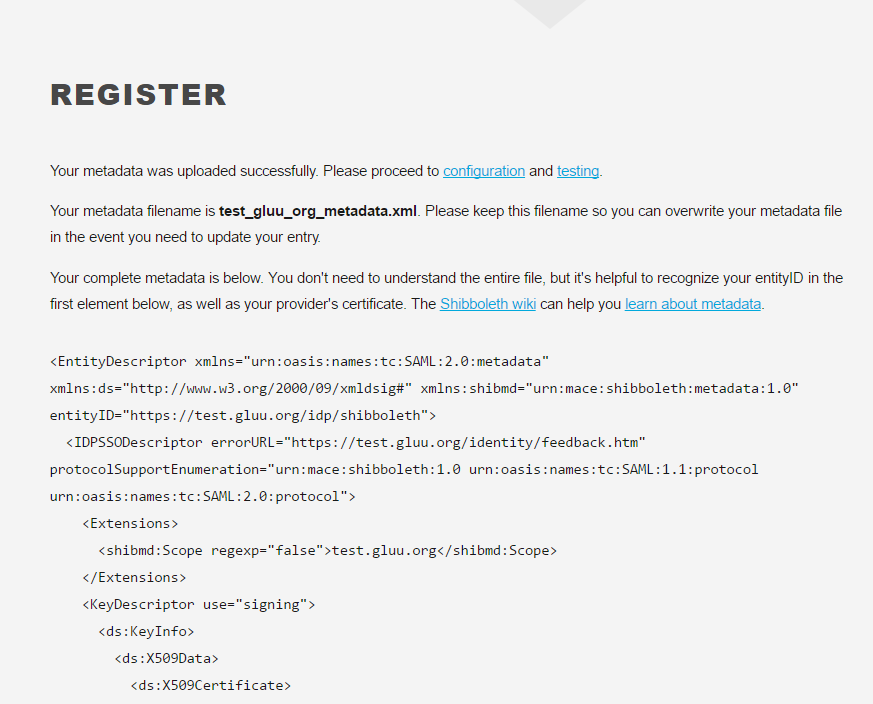
https://www.testshib.org/register.htmlpage - After successful registration, you will get something like this:
- Now let's move forward to
Gluu Server configuration
Gluu Server configuration#
- Download TestShib2 metadata from
https://www.testshib.org/metadata/testshib-providers.xml - Log into Gluu Server oxTrust
- Create Trust Relationship with TestShib-provider metadata:
- We need to create a
Federationtrust relationship with this metadata SAML->Add Trust Relationship- DisplayName: TestShib federation
- Description: TestShib federation
- Entity type: Single SP
- Metadata Location: File
- SP metadata file: upload
testshib-providers.xmlmetadata - Configure Relying Party(add
SAML 2 SSO Profile) - Released attributes:
transcientIdandUsername Add- Wait for validation success for this trust relationship.

- Create Trust Relationship with TestShib SP:
- Now we need to create a
Federated trust relationship- DisplayName: TestShib SP trust
- Description: TestShib federated SP
- Entity Type: Single SP
- Metadata Location: Select
Federationfrom drop down menu - Federation Name:
TestShib Federation - Entity ID: click on this link, select
https://sp.testshib.org/shibboleth-sp - Configure Relying Party(add
SAML 2 SSO Profile) - Released attributes:
transientIdandUsername Add

TestShib2 configuration: part 2#
- Hit
https://sp.testshib.org/in browser - Put the entityID of your Gluu Server here.
- Hit
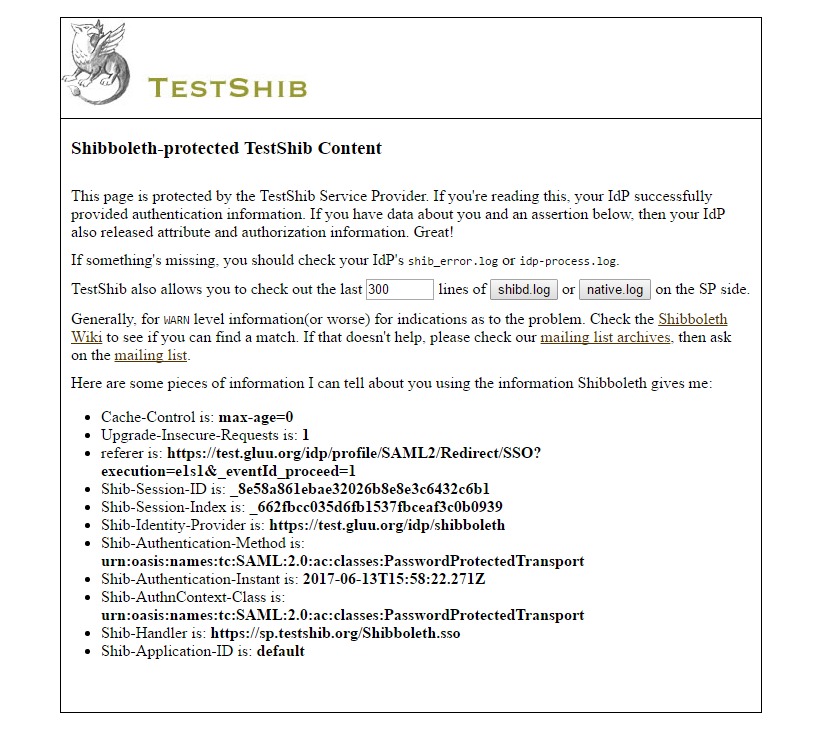
Go. - If everything goes well, you will something like this:
Troubleshooting#
-
Error code: 'Web Login Service - Unsupported Request The application you have accessed is not registered for use with this service.' from Gluu Server
- Reason: Metadata is not loading properly.
- Resolution: Need to fix metadata-provider velocity template
-
HowTo:
- Backup existing 'metadata-providers.xml.vm' from
/opt/gluu/jetty/identity/conf/shibboleth3/idplocation - Modify 'metadata-providers.xml.vm' code like below
- Exit Gluu-Server container
- Stop/Start Gluu-server container by:
$service gluu-server-3.x.x stop$service gluu-server-3.x.x start - Backup existing 'metadata-providers.xml.vm' from
-
Wait for 10 mins.
metadata-provider.xml.vmlfile:
<?xml version="1.0" encoding="UTF-8"?>
<MetadataProvider id="ShibbolethMetadata" xsi:type="ChainingMetadataProvider"
    xmlns="urn:mace:shibboleth:2.0:metadata"
    xmlns:resource="urn:mace:shibboleth:2.0:resource"
    xmlns:security="urn:mace:shibboleth:2.0:security"
    xmlns:md="urn:oasis:names:tc:SAML:2.0:metadata"
    xmlns:xsi="http://www.w3.org/2001/XMLSchema-instance"
    xsi:schemaLocation="urn:mace:shibboleth:2.0:metadata http://shibboleth.net/schema/idp/shibboleth-metadata.xsd
                        urn:mace:shibboleth:2.0:resource http://shibboleth.net/schema/idp/shibboleth-resource.xsd
                        urn:mace:shibboleth:2.0:security http://shibboleth.net/schema/idp/shibboleth-security.xsd
                        urn:oasis:names:tc:SAML:2.0:metadata http://docs.oasis-open.org/security/saml/v2.0/saml-schema-metadata-2.0.xsd">

    <!-- ========================================================================================== -->
    <!--                             Metadata Configuration                                         -->
    <!--                                                                                            -->
    <!--  Below you place the mechanisms which define how to load the metadata for the SP you will  -->
    <!--  provide a service to.                                                                     -->
    <!--                                                                                            -->
    <!--  The Shibboleth Documentation at                                                           -->
    <!--  https://wiki.shibboleth.net/confluence/display/IDP30/MetadataConfiguration                -->
    <!--  provides more details.                                                                    -->
    <!--                                                                                            -->
    <!--  NOTE.  This file SHOULD NOT contain the metadata for this IdP.                            -->
    <!--                                                                                            -->
    <!-- ========================================================================================== -->


#foreach( $trustRelationship in $trustParams.trusts )

#if($trustRelationship.spMetaDataSourceType.value == 'file')
        <MetadataProvider id="SiteSP$trustParams.trustIds.get($trustRelationship.inum)" xsi:type="FilesystemMetadataProvider"
            metadataFile="$medataFolder$trustRelationship.spMetaDataFN" >
#end
#if($trustRelationship.spMetaDataSourceType.value == 'uri')
        <MetadataProvider id="SiteSP$trustParams.trustIds.get($trustRelationship.inum)" xsi:type="FileBackedHTTPMetadataProvider"

        metadataURL="$trustRelationship.spMetaDataURL"
        backingFile="$medataFolder$trustRelationship.spMetaDataFN"
        maxRefreshDelay="$trustRelationship.maxRefreshDelay" >
#end

#if( $trustRelationship.gluuSAMLMetaDataFilter and $trustRelationship.getGluuSAMLMetaDataFilter().size() > 0 )
            <MetadataFilter xsi:type="ChainingFilter" xmlns="urn:mace:shibboleth:2.0:metadata">
#foreach( $filter in $trustRelationship.getGluuSAMLMetaDataFilter() )
$filter
#end
            </MetadataFilter>
#end
#if($trustRelationship.spMetaDataSourceType.value == 'file' || $trustRelationship.spMetaDataSourceType.value == 'uri')
        </MetadataProvider>
#end
#end

</MetadataProvider>